
Every task has an owner and a due date.
Assign the task to a member, set its priority and due date, and follow it from “To do” to “Done” in a table or on a board.
Lots of work. One workspace.
Your clients, projects, team tasks and invoices.
Tarteeb brings your agency's work into one Arabic-first workspace,
so you know where things stand and what's next.
Where every relationship starts.
From idea to delivery.
Know what you're owed, and what's left.
MarketingDesignDevelopmentConsulting
Work, in order.Why Tarteeb?
Tarteeb links your team's tasks to their projects, clients and invoices, so you know who's working on what, what's overdue, and what's next.
Assign the task to a member, set its priority and due date, and follow it from “To do” to “Done” in a table or on a board.
What's overdue and due today or tomorrow is clear to every member, and the Deadline Guardian gathers it into one tidy notice.
Every completed task moves its project's progress, and the project's invoices are linked to it, so you know where things stand and how much is left.
Tarteeb agents
13 agents, each with one job: sorting new tasks, guarding deadlines, spotting project risks, drafting status reports and preparing payment reminders. You work with them the way you work with your colleagues.
Agent availability and daily run limits depend on your plan.
One platform, many details
From the first task to the last riyal on the invoice: tools built for the way Saudi agencies work, and agents that help you follow up.
Assign a task or mention a teammate in a comment, and they get a notification on the notifications bell, without side messages.
The same tasks as a table, board, calendar or timeline, by project, client or assignee.
Madar website · Project tasks
Write your brief, and the Project Kickoff Planner reads the project's description and tasks and suggests starting tasks. You approve, and it adds them.
Invoices linked to the client and project, with an Arabic PDF in your agency's branding, and outstanding amounts that update when you record a payment.
A right-to-left interface, Gregorian dates with Arabic month names, and amounts in riyals on every screen.
Your work is connected. So are your tools.
Follow the “Madar” website project from the first contact to the recorded payment. Pick a stage and see how it affects the work.
An illustrative simulation on this page; it doesn't read or change your account data.1 of 5 · Client
Contacts, relationship history and projects in one profile. Try logging a follow-up with this project's client.
Madar demo client
Log what you agreed on, so your team keeps the context.
2 of 5 · Project
Link the project to its client and set its scope. Follow its tasks, value and invoices as your permissions allow; completing a task here changes the project's progress.
Illustrative demo · doesn't create a record or send an invoice.
Madar website design and development
Scope: sitemap and homepage design.
3 of 5 · Tasks
Every task has an assignee and a status. Try completing the homepage design, then go back to the project to see the effect.
Homepage design
Next step: review the design with the team.
4 of 5 · Invoice
The invoice is linked to the client and the project. In Tarteeb you can download a PDF with your agency's branding or email the invoice; this example is for display only.
Illustrative demo · doesn't create a record or send an invoice.
Madar website design and development
5 of 5 · Outstanding
Record a payment when it arrives to update what's outstanding. Recording is your own note of it, not payment processing or a bank confirmation.
5,750.00 SAR
Waiting for a payment to be recorded
In your workspace, the Home page brings together tasks, projects and amounts due, so you start with what needs your attention.
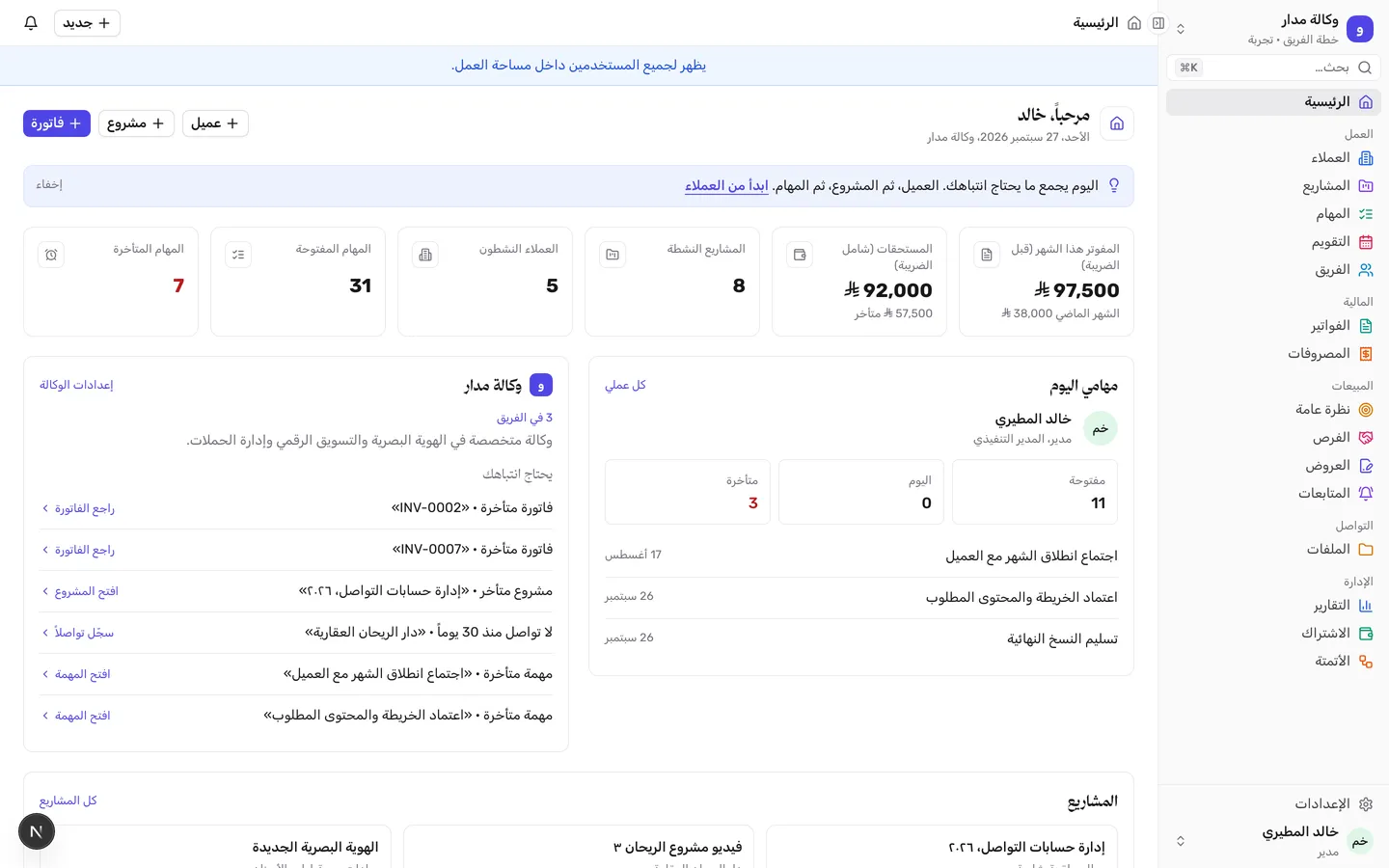
One workspace. Connected tools.
Instead of jumping between scattered spreadsheets and apps, Tarteeb brings the tools of your daily work into one workspace. Every tool knows its client and project, so you and your team always see the full picture.
The tools available depend on your plan and your role in the workspace. Compare plans
Start from a template, not a blank page.
When you create your workspace, your first project starts with the tasks of its kind's template. Whenever you start a new project, pick its template: tasks with due dates and priorities that you adjust to fit your work.
Social media management (monthly)
A monthly content plan, design and publishing, and a performance report at the end of the month.
Marketing agency: Social media management (monthly) · 1 of 4
Drag the card aside, or use the arrows to browse the templates.
Before your first step
Quick answers about tasks, invoices, agents and pricing, before you start.
Who Tarteeb is for, and how to start your agency's workspace.
Marketing agencies, creative studios, digital agencies, and consulting and service teams that manage multiple clients and projects. Whether you're starting on your own or working with a team, you keep the details of your work in one workspace.
Create your account, name your workspace, then add a project you're working on now, with its client if there is one, so it starts with ready-made tasks from its kind's template. Or start with an empty workspace. Then invite your team and turn on the agents that suit your work.
No. Creating an account doesn't buy any plan, and you can start without a card. You choose your subscription later from inside your workspace, when you're ready. Plans and pricing
Yes. The interface is Arabic and right-to-left, dates are Gregorian with Arabic month names, amounts are in riyals, and PDF invoices are in Arabic with your agency's branding. An English interface is also available.
Yes. Tarteeb runs in the browser on your phone and computer, with no app to install.
Views, permissions, and keeping up with what's yours.
Yes. Switch between table, board, calendar and timeline, and filter tasks by project, client or assignee. In “My work” you'll find the tasks assigned to you.
Managing, working and viewing come with different permissions. You set each member's role, and a project's value, budget and financial panel stay visible to admins only.
“My work” shows your tasks, and the notifications bell at the top of the page shows what's for you, like a task assigned to you or a mention in a comment. Home gathers what's overdue and due today, so you start with what needs your attention.
Yes. Your first project starts with the tasks of its kind's template, and when you create any project, pick from ready project templates: tasks with due dates and priorities that you adjust to fit your work.
From quote to recorded payment.
Create invoices linked to the client and project, and set their VAT and due date. Download an Arabic PDF with your agency's branding, or email it to the contacts you choose. Follow the send history and what's outstanding, and record payment when it arrives.
Not at the moment. You record a payment when it arrives so outstanding amounts update; recording it is your own record-keeping, not payment processing or bank confirmation.
Yes. In “Quotes”, workspace admins prepare a quote and publish it as a PDF, then record the client's acceptance and turn the quote into a project.
Yes. Record expenses and link them to the project and client, and project profitability appears in financial reports, depending on your plan.
What the agents do, and what stays in your hands.
Each agent has one job: sorting new tasks, guarding deadlines, spotting project risks, drafting status reports, following up on opportunities and quiet clients, preparing payment reminders, balancing the team's workload, and sending each member a morning briefing.
You choose for each agent: “Suggests, and I approve” or “Takes safe steps on its own”. Closing tasks and moving them away from their owners always waits for your approval, and every step is logged under the agent's name.
Yes. Workspace admins can undo an agent's step within 14 days, as long as the record hasn't changed since. A notice that has already been sent can't be recalled.
No. Agents don't send messages or emails to your clients, and they don't change your financial records. They prepare drafts in tasks, and you're the one who reviews and sends them.
The number of agents depends on the plan, and the pricing page shows how many each plan includes. You turn them on from the “Agents” page in your workspace. Plans and pricing
Plans, the trial, and payment.
The pricing page lists prices, each plan's limits and the features available today. You choose your subscription from inside your workspace, and the page explains how long the trial lasts and what happens when it ends. Pricing page
No. Each plan covers one agency workspace, and the workspace's members share the plan up to its limit, with no separate fee per member.
By card (mada, Visa or Mastercard) from the subscription page inside your workspace.