Tarteeb connects every stage of your agency's work: the client, the quote, the project, the tasks, the invoice and the balance due. Each stage builds on the one before, so you know where things stand and what's next.
Follow the “Madar” website project from the first contact to the recorded payment. Pick a stage and see how it affects the work.
An illustrative simulation on this page; it doesn't read or change your account data.
1 of 5 · Client
The relationship starts here. Its context stays with you.
Contacts, relationship history and projects in one profile. Try logging a follow-up with this project's client.
Madar websiteIllustrative example
Client profile
Madar demo client
Relationship
Active client
Linked project
Madar website
Awaiting follow-up
Log what you agreed on, so your team keeps the context.
2 of 5 · Project
From agreement to work with a clear path.
Link the project to its client and set its scope. Follow its tasks, value and invoices as your permissions allow; completing a task here changes the project's progress.
Illustrative demo · doesn't create a record or send an invoice.
Madar websiteIllustrative example
Client / Madar demo client
Madar website design and development
Scope: sitemap and homepage design.
Work value excl. VAT
5,000.00 SAR
Task progress
50%
Define the scopeCompleted
Homepage designIn progress
3 of 5 · Tasks
A clear assignee. A step that gets done.
Every task has an assignee and a status. Try completing the homepage design, then go back to the project to see the effect.
Madar websiteIllustrative example
Madar website project tasks
Homepage design
Assignee
Sara · Design
Status
In progress
Project progress
50%
Next step: review the design with the team.
4 of 5 · Invoice
What your work is worth, clearly itemized.
The invoice is linked to the client and the project. In Tarteeb you can download a PDF with your agency's branding or email the invoice; this example is for display only.
Illustrative demo · doesn't create a record or send an invoice.
Madar websiteIllustrative example
Illustrative invoice / Madar demo client
Madar website design and development
Work value excl. VAT
5,000.00 SAR
VAT (15%)
750.00 SAR
Total incl. VAT
5,750.00 SAR
Payment status
Payment due
5 of 5 · Outstanding
Know what's left, and record what comes in.
Record a payment when it arrives to update what's outstanding. Recording is your own note of it, not payment processing or a bank confirmation.
Madar websiteIllustrative example
Amount due incl. VAT
5,750.00 SAR
Waiting for a payment to be recorded
Recorded as collected
0.00 SAR
Tasks done
1 of 2
Last contact
Not logged in the simulation
Contact: Not loggedProject: LinkedTasks: 1 of 2Outstanding: 5,750.00 SAR
1 of 5
Connected details. The full picture in front of you.
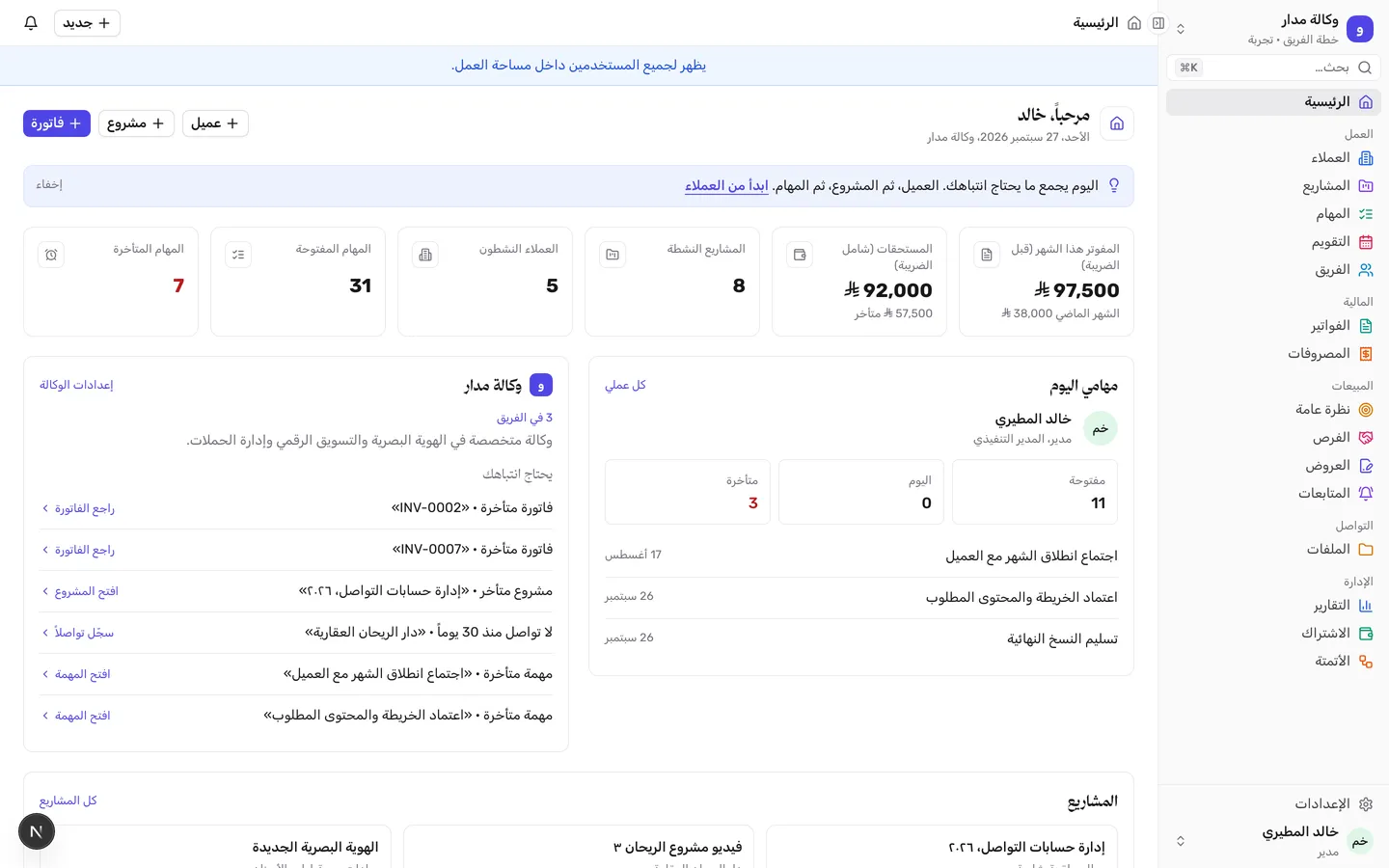
In your workspace, the Home page brings together tasks, projects and amounts due, so you start with what needs your attention.
See the Home page inside Tarteeb A real screenshot with test dataScreenshot from a local copy on September 27, 2026, with test data only. The numbers are separate from the simulation above. Open the full-size image (new window)
01
The start: a lead and a clear sales opportunity
Most agency projects start with a message or a form request. Tarteeb collects your form responses, and from a response you can create a lead, link it to an existing client or open a sales opportunity, so no request gets lost in your messages. Whether forms are available depends on your plan.
Opportunities move through stages until they close, and each one has a next step and a date. The Follow-ups page in Sales flags upcoming steps, opportunities that haven't moved in a while, expected close dates that have passed, and quotes waiting for a reply or about to expire.
Forms that turn requests into leads or opportunities
Opportunity stages, with a next step for each one
Alerts for stalled opportunities and pending quotes
02
The quote: a documented agreement before work starts
You write the quote with line items, quantities and prices, and you can split it into milestone payments. Quotes have versions, so if you make changes after talking with the client, every published version stays saved as it was.
When the client agrees, you record their acceptance of the published version, then create the project straight from it. The project starts from the exact agreement the client accepted, instead of rewriting the scope from scratch.
Line items, prices and milestone payments
A saved version for every published change
Create the project from the accepted quote
03
Projects and tasks: who does what, and when
Each project is linked to its client and brings its tasks, value and invoices together in one place, shown according to each team member's permissions. You break the work into tasks, each with an assignee, a status and a due date, so everyone knows what's on their plate without another meeting.
Each member sees their tasks on the “My work” page, and the manager follows the project's progress as tasks get done. Team task management becomes part of the project itself, not a separate list.
Every project linked to a client
An assignee, status and due date for every task
A “My work” page for every team member
Permissions that set what each member sees
04
The invoice: Arabic PDF invoices with your agency's branding
When it's time to get paid, you create the invoice linked to the client and the project. You can download it as a PDF with your agency's branding or email it to the client from inside Tarteeb, and for monthly retainer work there are recurring invoices.
Because the invoice is linked to the project, you know how much of the work's value has been invoiced and how much is left, without matching up separate spreadsheets by hand.
Download invoices as PDFs with your agency's branding
Send invoices by email
Recurring invoices for monthly work
05
Balances and follow-up: know what's owed, record what's paid
When money comes in from a client, you record the payment against the invoice and the balance due updates right away. A payment recorded by mistake can be reversed. Recording is your own note of what arrived, not payment processing or a bank confirmation, and only workspace Admins can do it.
Home gathers what needs your attention, like overdue or soon-due tasks and invoices, grouped into delivery, clients, sales, collections and finance. You start your day with what matters most instead of hunting for it.
Record payments, and reverse them if there's a mistake
The balance due updates with every payment
A “Needs your attention” list on Home
Collections and finance visible to Admins only
What are you buying?
What exactly are you buying?
You subscribe to one workspace for your agency, with clients, sales, quotes, projects, tasks and invoices. Some features, like forms, depend on your plan, so compare plans before you choose. Tarteeb doesn't process your clients' payments; you record what comes in.